
Useful defaults
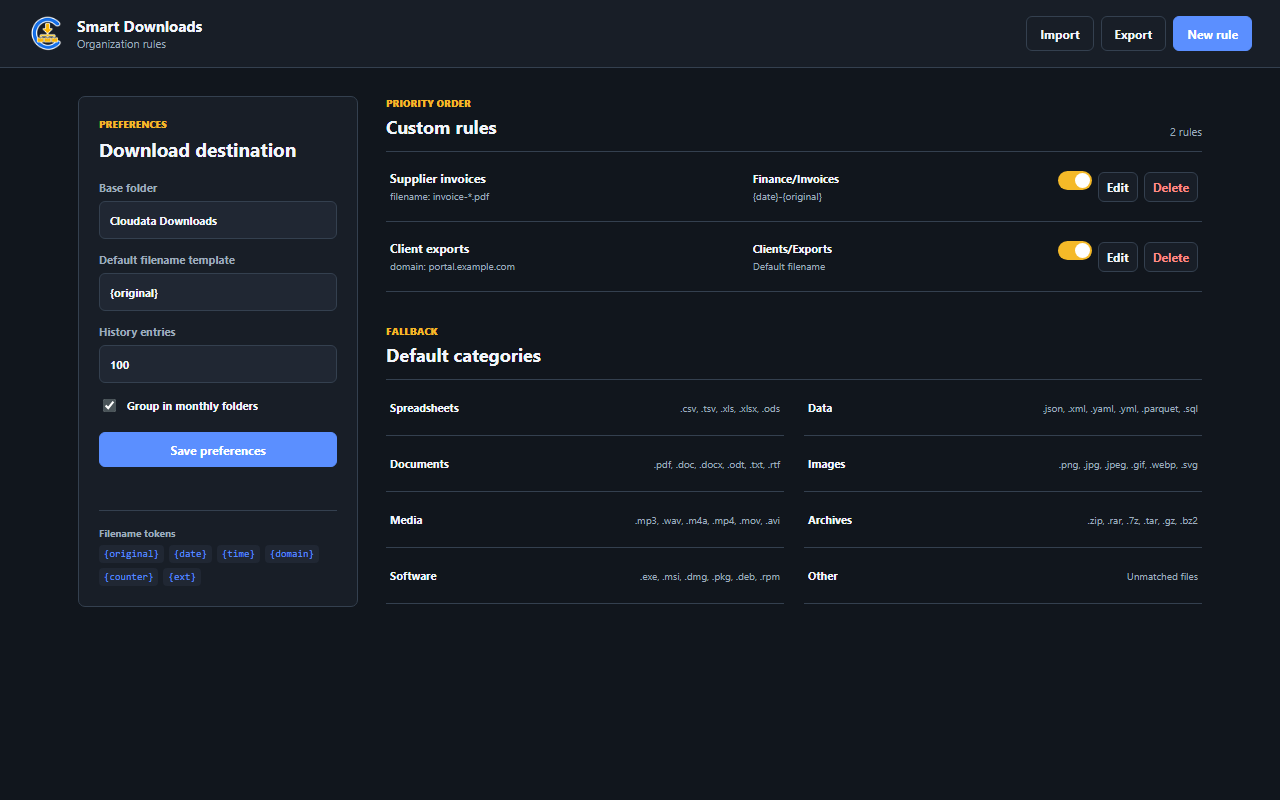
Organize spreadsheets, data, documents, images, media, archives, software, and other files.
 Browser extensionVersion 1.0.0
Automatically organize new browser downloads into safe category folders and apply predictable local naming rules.
Capabilities
Each extension solves a specific workflow while keeping setup, control, and data handling easy to understand.
Organize spreadsheets, data, documents, images, media, archives, software, and other files.
Match filename, extension, MIME type, or source domain to choose the right destination.
Build names from original values, date, time, domain, counters, and extensions.
Use monthly folders, a configurable base folder, bounded history, and rule import or export.
Simple workflow
Keep the default categories or add matching and naming rules for your workflow.
The extension classifies each new file and proposes a safe relative path.
Use predictable folders, names, and local history to locate recent downloads.
Security and privacy
The extension follows Manifest V3 practices and limits data handling to what its purpose requires.
Product questions
Automatically organize new browser downloads into safe category folders and apply predictable local naming rules.
Cloudata Smart Downloads supports Google Chrome, Manifest V3, Local rules.
All classification and naming logic runs locally without transmitting download metadata. Unsafe path characters are removed and generated paths remain relative to the browser Downloads directory. File conflicts use Chrome's safe uniquify behavior and history remains bounded locally.
Keep downloads organized automatically without changing how your team uses the browser.