
Practical recording
Capture clicks, input, selections, checks, key presses, navigation, and optional scrolling.
 Browser extensionVersion 1.0.0
Record repetitive website tasks and replay them with visible steps, stable selectors, and approval before sensitive actions.
Capabilities
Each extension solves a specific workflow while keeping setup, control, and data handling easy to understand.
Capture clicks, input, selections, checks, key presses, navigation, and optional scrolling.
Generate stable CSS selectors with support for open Shadow DOM paths and iframe metadata.
Highlight playback targets and require confirmation for sensitive or high-impact actions.
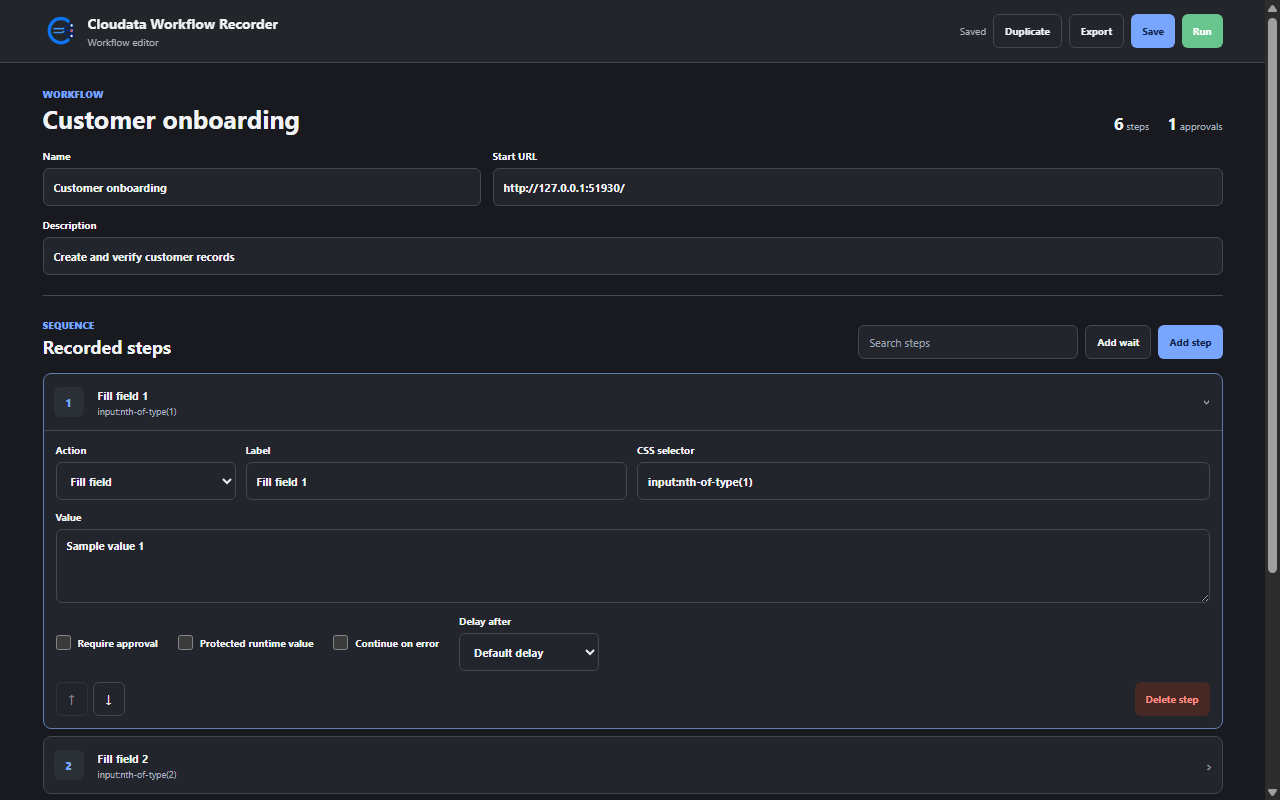
Review every step, tune delays, stop on errors, and import or export workflows as JSON.
Simple workflow
Start on the target site and complete the browser task normally.
Inspect selectors, protected values, delays, and proposed approval points.
Replay the workflow and approve protected steps directly on the page.
Security and privacy
The extension follows Manifest V3 practices and limits data handling to what its purpose requires.
Product questions
Record repetitive website tasks and replay them with visible steps, stable selectors, and approval before sensitive actions.
Cloudata Workflow Recorder supports Google Chrome, Manifest V3, Local workflows.
Workflow data stays in extension-only local storage and is never sent to Cloudata or third parties. Password-like values become secret placeholders and runtime values remain in memory only for the approved step. Imports are normalized, limited to 5 MB, and bounded by workflow and step limits.
Standardize repetitive browser work while keeping high-impact decisions in human hands.